Third-Party Resources
This page explains how to integrate PR with third-party resources.
All third-party integrations on this page required Pager Reborn, and do not work for Sonoran Edition. For more info, see here.
zFires
Follow the steps below to send a page when a player started fire is created, and when automatic incidents are created.
This is a temporary integration; the resource will be updated soon so you do not need to copy/paste by hand.
Old - Lines 232-240:
if integrations["infernoPager"] then
    hasSentAlert = true
    TriggerEvent(
        "Fire-EMS-Pager:PageTones",
        { "fire" },
        true,
        { incident.type, incident.description, incident.location }
    )
end
New - Lines 232-238:
if integrations["infernoPager"] then
    hasSentAlert = true
    TriggerEvent("Inferno-Collection:Server:PagerReborn:Editable:CreatePage", {
        addresses = {"emg.fire.*"},
        message = incident.description .. " " .. incident.location
    })
end
SmartFires
Follow the steps below to send a page when a player started fire is created, and when automatic fires are created.
- Inside
SmartFires, openconfig.lua. - Locate
fireAlerts = {...}, then find['infernoPagerReborn'] = {...}.
- Set
enabledtotrue, and updateaddressesToPageto the addresses you would like to use.
To customize even further, you can find the infernoPagerReborn section in sv_utils.lua and make changes directly to the server event using the same parameters as the CreatePage event.
CD_Dispatch
Follow the steps below to send a page when a new notification is created for one or more specific jobs.
- Inside
inferno-pager-reborn, openeditable/server/events.lua. - Locate the
CD Dispatch, then uncomment (remove the--) the section below.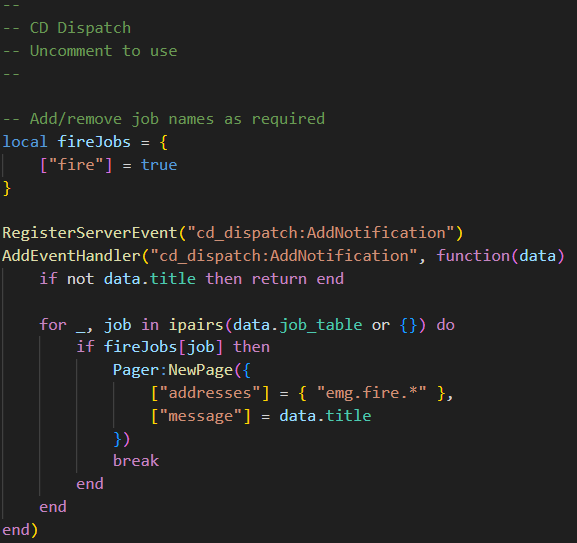
- Update
fireJobswith the names of jobs you would like to use.
You can customize Pager:NewPage to your liking using the same parameters as the CreatePage event.
LoveRP Emergency Dispatch
Follow the steps below to send a page when a new notification is created for one or more specific jobs.
- Inside
inferno-pager-report, openeditable/server/events.lua. - Locate the
LoveRP Emergency Dispatch, then uncomment (remove the--) the section below.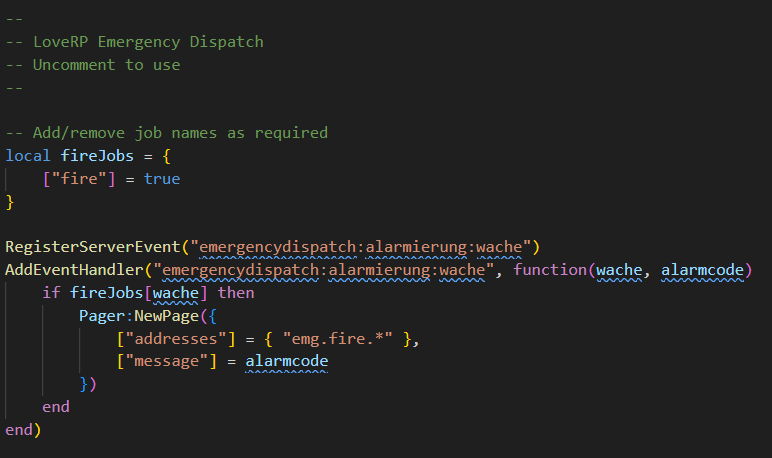
- Update
fireJobswith the names of jobs you would like to use.
You can customize Pager:NewPage to your liking using the same parameters as the CreatePage event.
Sonoran CAD
To connect Sonoran CAD and Pager Reborn, ensure that Sonoran CAD starts before PR does.
When PR connects with Sonoran CAD, you will see a log entry in the console:
Sonoran CAD detected
You can now use Sonoran CAD to send Page messages. For more info, see here.